






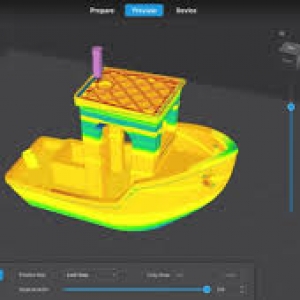




Creating strong and durable 3D models requires more than just a quality printer and filament. The right creality print settings can significantly improve the strength, reliability, and lifespan of your printed parts. Whether you are producing functional components, prototypes, or mechanical parts, optimizing your print settings ensures that your models can withstand stress and daily use.
Creality printers are known for their versatility and user-friendly operation, but achieving maximum durability requires careful adjustment of several settings. From layer height to infill density, every parameter plays a role in the final strength of the printed object. This guide explores the best creality print settings to help you create robust and long-lasting 3D models.
Choose the Right Layer Height for Maximum Strength
Layer height directly impacts the structural integrity of a 3D print. For stronger models, a layer height between 0.16 mm and 0.24 mm is generally recommended. These settings provide an excellent balance between print quality and layer adhesion. Smaller layers allow each new layer to bond more effectively with the previous one, resulting in stronger parts.
When using creality print settings, avoid extremely large layer heights if durability is your primary goal. Thick layers can reduce the bonding area between layers and create weak points. While larger layers may reduce printing time, sacrificing strength is often not worth the trade-off for functional components that need to endure stress.
Optimize Infill Density and Pattern
Infill density is one of the most important factors affecting the strength of a 3D print. For highly durable models, an infill density between 30% and 60% works well in most situations. Functional parts that experience heavy loads may benefit from even higher infill percentages, while decorative items can use lower densities.
The infill pattern also matters when configuring creality print settings. Patterns such as Gyroid, Cubic, and Tri-Hexagon provide excellent strength in multiple directions. Gyroid infill is particularly popular because it distributes force evenly throughout the model, improving durability without significantly increasing print time or filament usage.
Adjust Wall Thickness and Perimeters
Wall thickness contributes significantly to overall model strength. Increasing the number of walls or perimeters creates a stronger outer shell that can better resist impacts and pressure. Most users achieve excellent results with three to five wall lines, depending on the application.
When setting up creality print settings, consider using a wall thickness of at least 1.2 mm to 2 mm for functional parts. A thicker shell often contributes more to strength than simply increasing infill density. This approach can also save material while still delivering highly durable prints capable of handling demanding tasks.
Set the Proper Printing Temperature
Printing temperature plays a crucial role in layer bonding. If the temperature is too low, layers may not fuse properly, resulting in weak and brittle prints. Higher temperatures generally improve adhesion between layers, increasing the overall strength of the finished model.
For PLA, temperatures between 200°C and 220°C often work best, while PETG typically performs well between 230°C and 250°C. Always consult the filament manufacturer's recommendations and fine-tune your creality print settings accordingly. Conducting small test prints can help identify the optimal temperature range for achieving the strongest results.
Reduce Print Speed for Better Layer Adhesion
While faster printing saves time, it can negatively affect the strength of your models. Slower print speeds allow the filament more time to bond with previous layers, resulting in stronger and more consistent prints. This is especially important when producing parts that must withstand mechanical stress.
Many users find that print speeds between 40 mm/s and 60 mm/s provide an excellent balance between quality and durability. When adjusting creality print settings, reducing speed can significantly improve layer adhesion and reduce defects such as under-extrusion, gaps, and weak bonding points that compromise structural integrity.
Improve Cooling and Material Selection
Cooling settings have a major impact on print strength. Excessive cooling can cause layers to solidify too quickly, preventing proper bonding. For stronger prints, moderate cooling is often preferable, especially when using materials like PETG or ABS. PLA typically requires more cooling, but reducing fan speed slightly can sometimes improve strength.
Material choice is equally important when optimizing creality print settings. PLA offers good rigidity and ease of use, while PETG provides better impact resistance and flexibility. ABS is known for its toughness and heat resistance, making it ideal for demanding applications. Selecting the right material for your project ensures that your settings work effectively to maximize durability.
Conclusion
Achieving strong and durable 3D prints requires careful attention to several key factors. Optimizing layer height, infill density, wall thickness, printing temperature, print speed, and cooling settings can dramatically improve the performance and longevity of your models. These adjustments help create prints that are capable of handling real-world stress and demanding applications.
By fine-tuning your creality print settings, you can consistently produce high-quality models with exceptional strength and reliability. Experiment with different combinations to find what works best for your specific printer and filament. With the right settings in place, your Creality printer can deliver durable and professional-grade results for a wide range of projects.