






Many organizations and individuals still use IBM Lotus Notes to manage their email. But as Microsoft Outlook becomes more popular, many users want to convert their data from Lotus Notes to Outlook. Because Outlook uses the PST file format, the process usually includes transferring or converting email data.
This guide explains how to migrate Lotus Notes Emails to PST in a simple and easy-to-understand way. We will also talk about why people migrate, compare different ways to do it and answer questions that come up a lot.
Why Do Users Migrate Lotus Notes Emails to PST?
Users migrate their Lotus Notes emails for a number of reasons.
-
Outlook is more user-friendly
Many people find it easier to use Microsoft Outlook since it has a clearer interface.
-
Better compatibility with Microsoft tools
Outlook works well with Microsoft 365, Teams and other Office programs.
-
Easier email management
Outlook has great tools for keeping track of emails, calendars and contacts.
-
Wider adoption
Many businesses select Outlook as their standard email platform.
Because of these reasons, a lot of people look for safe solutions to export Lotus Notes emails to PST without losing any vital data.
Things to Check Before Migration
Make sure you do the following checks before you start the migration process.
-
Install Lotus Notes
You need to have Lotus Notes installed on your computer in order to open NSF email files.
-
Set up Microsoft Outlook
You also need to install Outlook to create or import a PST file.
-
Backup your data
Before you start migrating make sure to back up your Lotus Notes mailbox.
-
Verify NSF file access
Ensure that you have proper access to the Lotus Notes NSF files.
These steps help ensure that the Lotus Notes to PST migration process runs smoothly.
Best Methods to Migrate Lotus Notes Emails to PST
There are two basic ways to migrate
- Manual Method
- Professional Migration Tool
Let's go through each strategy one at a time.
Method 1: Manual Method to Migrate Lotus Notes Emails to PST
This solution takes advantage of Lotus Notes' export function and Outlook's import function.
Step 1: Export Emails from Lotus Notes
- Open Lotus Notes on your computer.
- Select the mailbox you want to transfer.
- Open File
- Click Export
- Choose the location where the file will be saved
- Select CSV format
- Click on Export
Now, your Lotus Notes emails will be saved in a CSV file.
Step 2: Import the File into Outlook
- Start Microsoft Outlook
- Click on File
- Choose Open and Export
- Select Import or Export
- Choose Import from a different file or software.
- Select a CSV file
- Choose the file that was exported
- Choose the destination folder
- Click Finish
Now you can access your Lotus Notes emails in Outlook.
Limitations of the Manual Method
The manual technique is free but it has a few problems:
- For big mailboxes it can take a long time.
- You could lose the formatting of your emails.
- Attachments might not go over correctly
- You need to know how to do things technically for the process to work.
- Not suitable for bulk migration
Because of these issues many users prefer using professional tools.
Method 2: Using a Professional Tool
Using a professional conversion tool is another useful way to migrate Lotus Notes emails to PST. These tools are meant to make the migration process easier and let users convert NSF files to PST format.
Most conversion tools let users read the NSF file, see the mailbox contents and export it straight to PST format without having to do a lot of manual processes.
Steps to Use a Professional Migration Tool
Most tools work in a basic way
- Install the NSF to PST converter software on your computer.
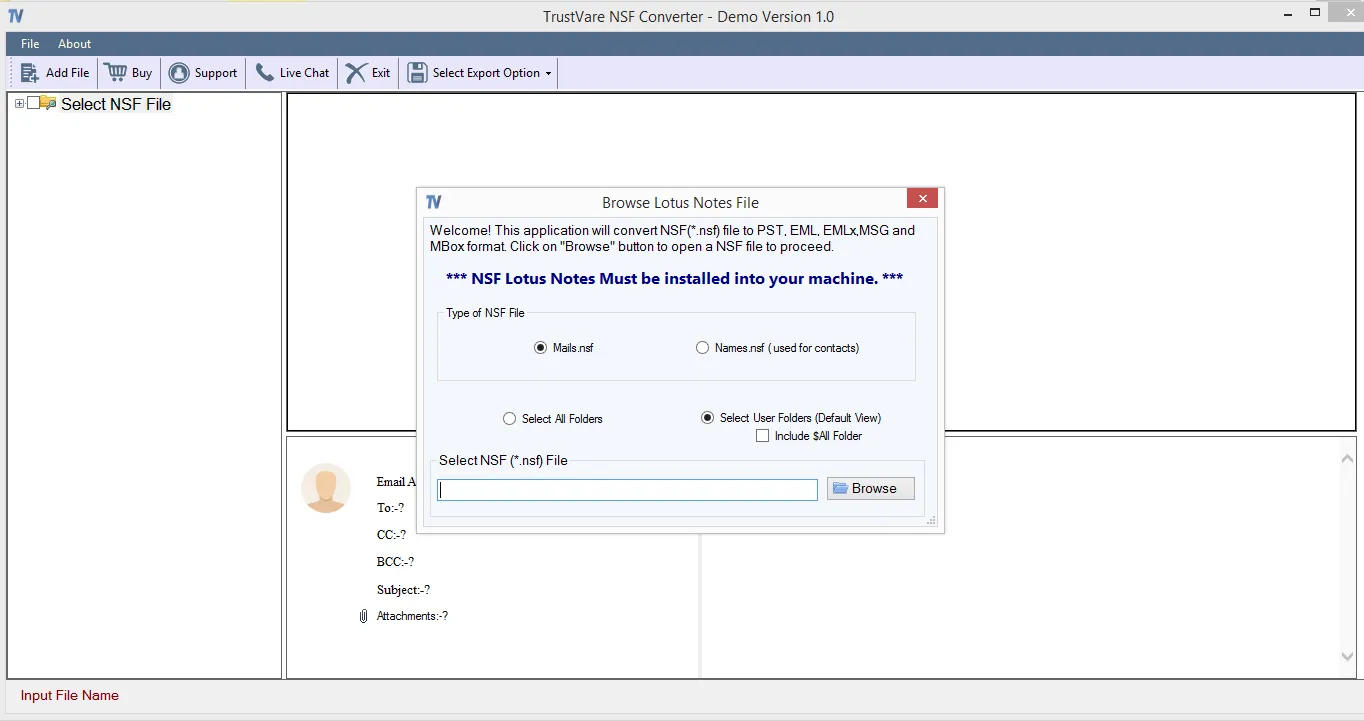
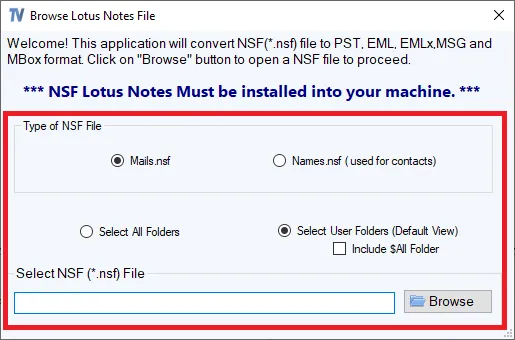
- Start the solution and add the NSF file from Lotus Notes
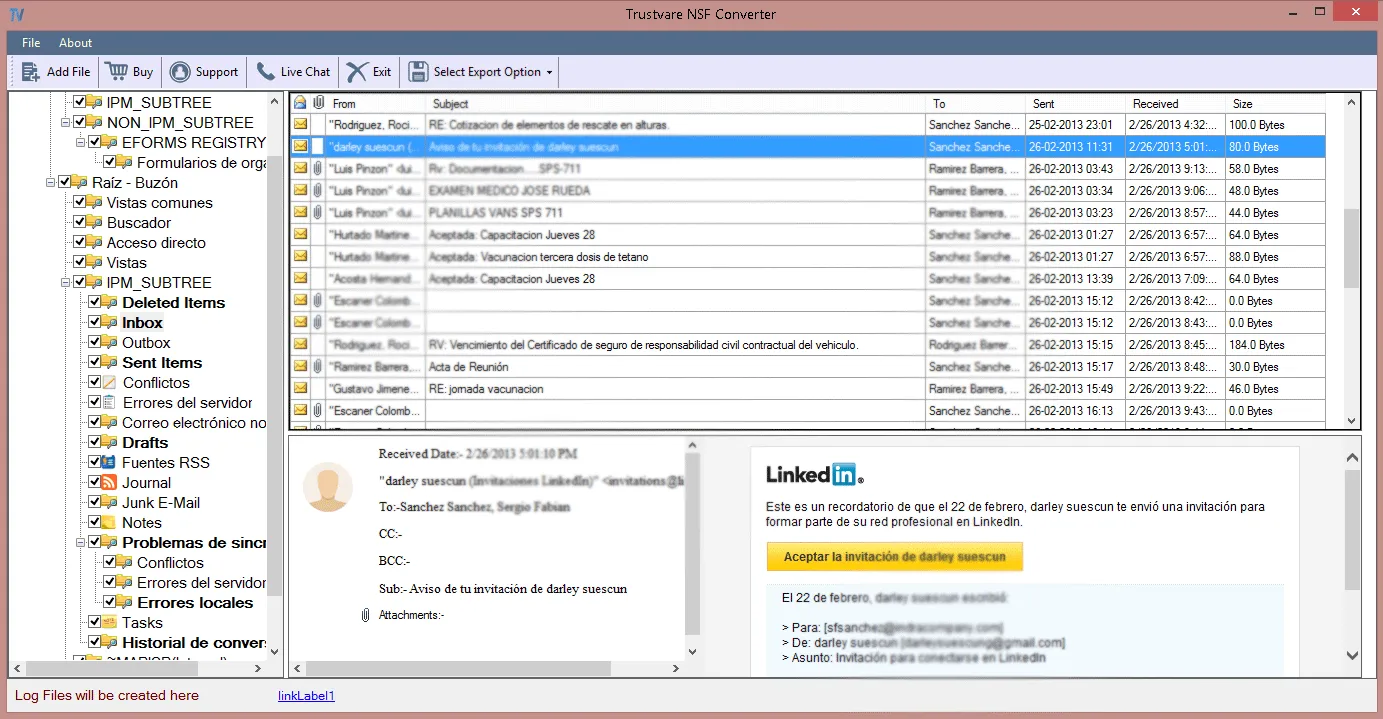
- Check out the inbox data, like emails, folders and attachments.
- Select PST as the format for the output.
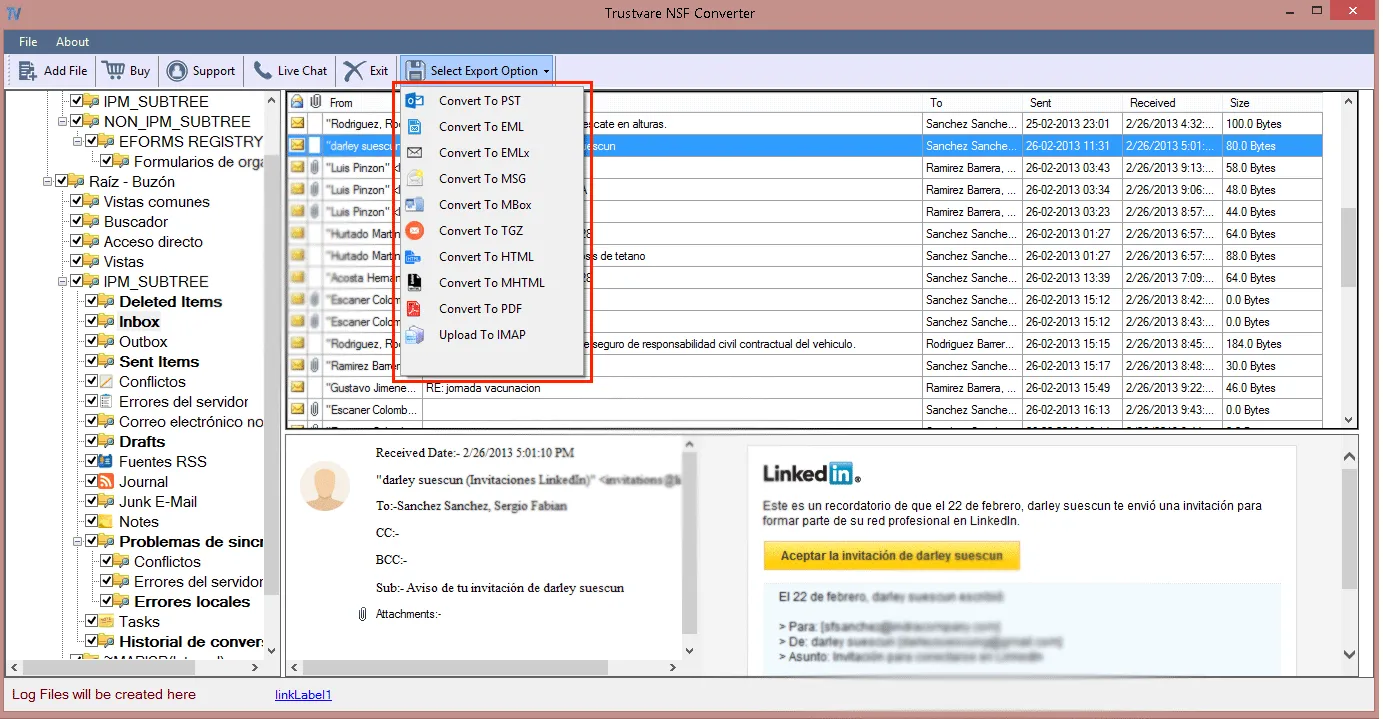
- Choose a location to save the files you converted.
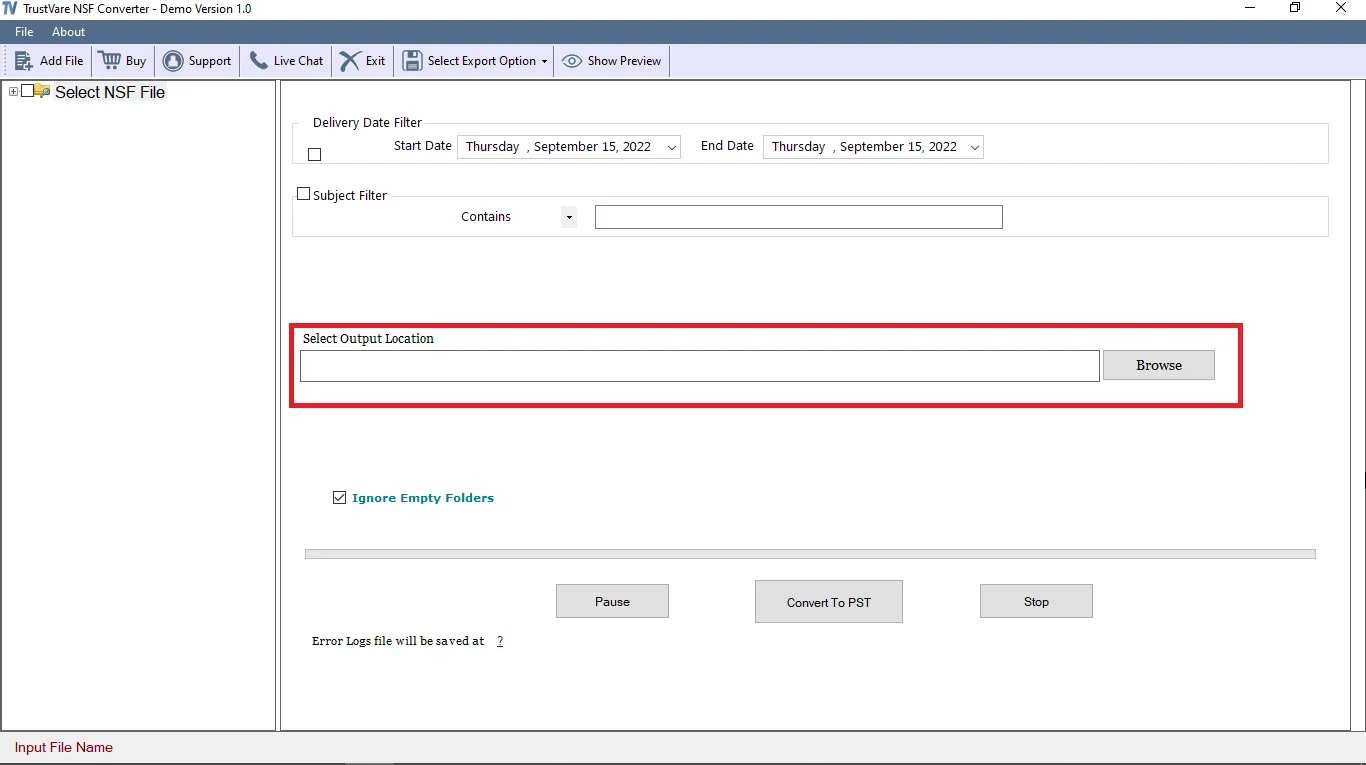
- Start the NSF email to PST conversion and save the PST file.
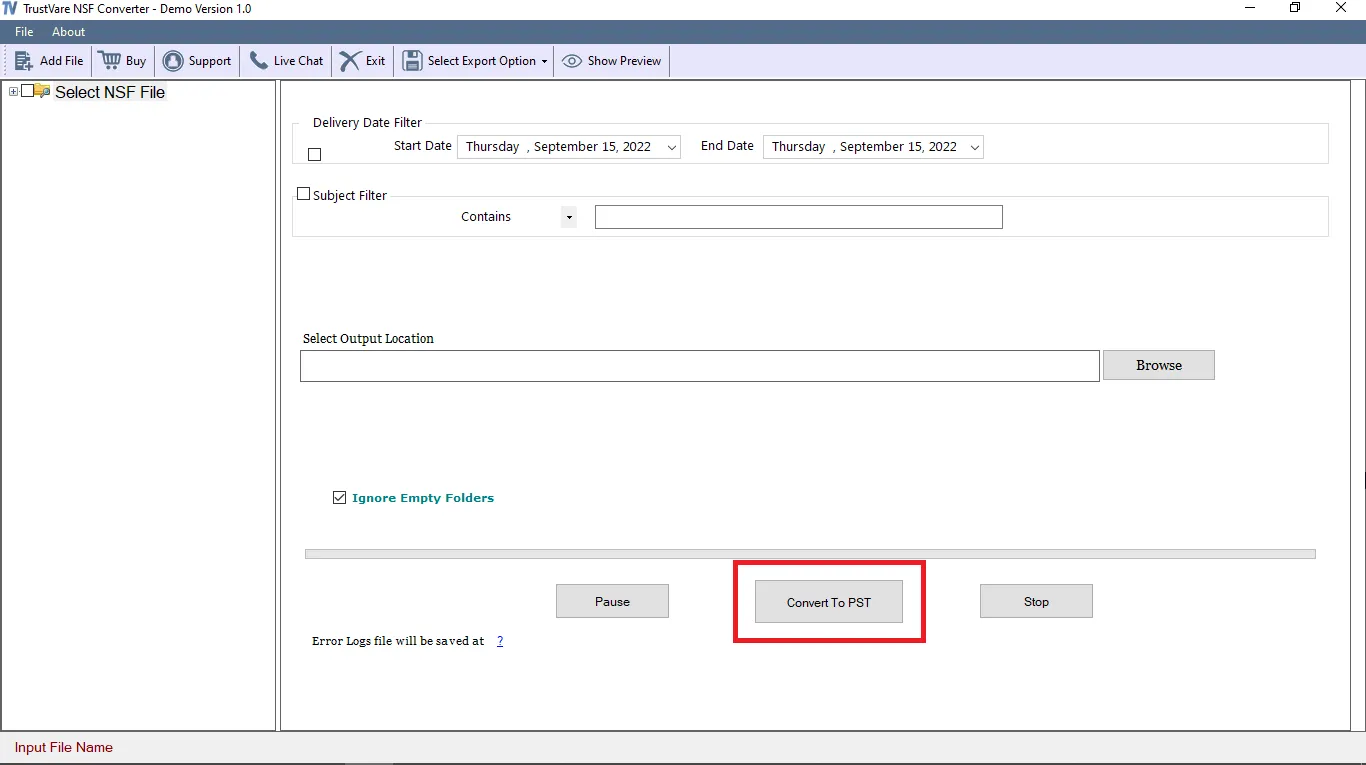
For this kind of migration, people often use tools like TrustVare NSF to PST Converter. These utilities can read Lotus Notes NSF files and convert them into Outlook PST format without changing the way the emails are set up.
One advantage of these tools is that they simplify the migration process and reduce the chances of data loss.
Benefits of Using a Professional Tool
There are many benefits of using a professional tool
- Migration is faster than doing it manually.
- Keeps the original formatting of the email
- Keeps the folder structure and attachments.
- Supports large mailbox files
- Allows you to choose which emails to convert
- Lowers the chance of data corruption
These solutions make it easy for users to migrate data safely without any technological problems.
Manual Method vs Professional Tool
|
Feature |
Manual Method |
Professional Tool |
|
Cost |
Free |
Paid |
|
Ease of Use |
Difficult |
Easy |
|
Data Accuracy |
Chance of losing data |
High accuracy |
|
Large Mailbox Support |
Limited |
Yes |
|
Email Attachments |
May not migrate properly |
Fully supported |
|
Speed |
Slow |
Fast |
This comparison shows that professional tools are better for migrating huge amounts of data or for business purposes.
Tips for a Successful Lotus Notes to PST Migration
Follow these tips to ensure a smooth migration:
1. Always make a backup
Don't start migrating your data until you've backed it up.
2. Check system compatibility
Check that both Outlook and Lotus Notes are installed and up to date.
3. Test with a small mailbox first.
Before moving all of your emails, test the process with a small amount of data.
4. Choose the right tool
Use a reliable migration tool if you are moving a lot of emails.
FAQs
-
What is a PST file?
Microsoft Outlook uses a PST file to keep emails, contacts, calendars, and other mailbox data.
-
Is it possible to open Lotus Notes emails in Outlook directly?
No, Lotus Notes uses NSF files and Outlook uses PST files, so you need to convert them.
-
Is it safe to migrate Lotus Notes emails to PST?
Yes, it is safe if you take the right measures and make a backup before you start the migration.
-
Is it possible to migrate attachments during the process?
Yes. Most professional tools can migrate emails and their attachments at the same time.
-
How long does the migration process take?
The amount of time it takes depends on the size of the mailbox. It takes longer to do manually but professional tools make the migration go much faster.
-
Can I migrate multiple NSF files to PST at once?
Yes. Batch conversion is supported by many professional migration applications. This lets users convert more than one NSF file to PST format at the same time.
In conclusion
As more companies switch to Microsoft based systems migrating emails from Lotus Notes to Outlook has become popular. You can migrate Lotus Notes emails to PST manually or with a professional tool.
The manual technique is free, but it has some drawbacks such as the risk of losing data and taking a long time. A professional migration tool is a better, faster and safer way to do things.
The manual method might work if you are moving a limited quantity of emails. But for big or business migrations it is advisable to use a program made just for it.