




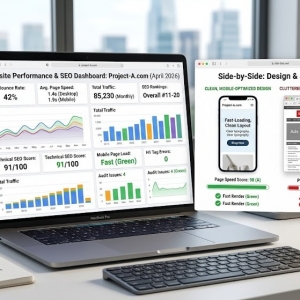







In the fast-paced world of the internet, every second counts. Studies have shown that if your website doesn't load within three seconds, you risk losing potential customers, missing out on sales, and experiencing a drop in organic traffic. Speed isn't just a technical detail; it's a fundamental aspect of converting visitors into customers.
This guide is designed for business owners, product managers, and anyone working with a web design agency. You don't need to be a developer to understand what slows down a site and how to address these issues. What you need is a strategic plan.
The Three-Second Rule: Why It Matters
Users have little patience, especially when dealing with slow mobile networks. Google also factors page experience into its ranking algorithms. A sluggish site creates friction, leading to fewer clicks, signups, and purchases. The financial impact is significant: poor-performing landing pages increase your advertising costs per sale. Speed directly influences acquisition costs and customer lifetime value.
Aim for a fast first impression. This doesn't mean achieving perfect scores on every metric. Instead, focus on delivering useful content quickly, allowing users to interact without delay.
Start with Data: Measure Before You Guess
Start by gathering data. Tools like PageSpeed Insights, Lighthouse, and GTmetrix can help you understand where time is being lost. Focus on critical pages such as the homepage, product pages, and checkout. Conduct tests from various locations and on mobile devices. Save these reports as your baseline.
Pay attention to key metrics:
-
Time to First Byte (TTFB): Indicates server response speed.
-
First Contentful Paint (FCP) and Largest Contentful Paint (LCP): Show when users see useful content.
-
Cumulative Layout Shift (CLS): Measures if elements shift during loading.
These metrics will guide you toward targeted solutions.
Quick Wins for Immediate Impact
Some optimizations are straightforward yet highly effective:
-
Compress and Resize Images: Many sites use oversized images. Resize them to fit the display, compress them aggressively, and use modern formats like WebP. Implement responsive images to serve smaller files to mobile devices.
-
Enable Compression and Caching: Use Gzip or Brotli to reduce the size of data in transit. Set browser caching headers to minimize repeat loads. A Content Delivery Network (CDN) can cache assets closer to users, reducing latency.
-
Defer and Async Noncritical JavaScript: Heavy scripts can block rendering. Load analytics and third-party widgets after the main content is displayed. Remove unused code and combine scripts when possible.
These changes may seem minor, but they collectively make a significant difference. If you're unsure how to implement them, a competent web design agency can handle these tasks efficiently.
Structural Fixes for Long-Term Performance
If quick wins aren't enough, consider architectural changes:
-
Choose Better Hosting: Shared servers often struggle with performance. Managed hosting or cloud providers with autoscaling capabilities can handle traffic spikes and reduce TTFB. Evaluate provider SLAs and real-world uptime.
-
Adopt a CDN: A CDN reduces latency for global users and efficiently handles large asset delivery.
-
Use Critical CSS and Server-Side Rendering: Rendering above-the-fold content on the server ensures users see something immediately while the rest of the page loads. Critical CSS helps the page paint quickly without waiting for full stylesheets.
For content-heavy applications, assess caching strategies and database queries. Slow queries and cache misses can severely impact performance under load.
Trimming Third-Party Weight
Third-party scripts, while convenient, are often culprits of slow performance. Chat widgets, ad tags, analytics, and social embeds can add significant load times. Audit your scripts, remove unused tools, and load third-party scripts asynchronously. Monitor their impact and consider lighter alternatives when possible.
Mobile-First and Progressive Enhancement
Given that most traffic comes from mobile devices, prioritize mobile design and testing. Mobile networks and CPUs are slower than desktops, so optimize content and interactions for phones. Use lazy-loading for images below the fold and avoid heavy animations and large font packs that block rendering.
Progressive enhancement means delivering a solid baseline experience to all users, then adding extras for devices that can handle them. This approach ensures a fast experience for most users while still allowing richer features where appropriate.
Continuous Monitoring and Measurement
Speed optimization is an ongoing process. New content, theme updates, or plugins can introduce performance regressions. Set up monitoring with real-user metrics and synthetic tests. Tools like Google Search Console, Pingdom, and synthetic monitoring platforms can alert you when metrics decline.
Track business KPIs alongside technical metrics. A drop in LCP that coincides with a fall in conversions indicates a real issue. Use this correlation to prioritize your optimization efforts.
When to Seek Professional Help
While you can handle many optimizations yourself, some issues require expertise. If your TTFB is high, database queries are slow, or the bottleneck is architectural, it's time to consult a specialist. Ask a web design agency for case studies focused on performance improvements. Request before-and-after metrics to ensure they prioritize real outcomes, not just vanity scores.
When hiring, provide your baseline reports and specify the pages that matter most. This approach reduces discovery time and accelerates impact.
The User-Centric Payoff
Speed optimization isn't just about technical metrics; it's about user experience. Faster pages lead to fewer frustrated visitors, higher engagement, and better conversion rates. They also reduce churn and improve ad ROI. For businesses, speed translates to measurable returns.
By starting with measurement, focusing on high-impact fixes, and continuously monitoring, you can make significant improvements. A few targeted changes can turn a three-second gamble into a reliable first impression.
Final Thought
Perfection isn't necessary to succeed. Focus on delivering meaningful content quickly, reducing blocking scripts, and serving assets efficiently. Test, measure, and iterate. If the task feels overwhelming, bring in a web design agency that understands performance as a core aspect of the product. Fast sites not only load quickly; they convert better. And that's what truly matters.